See what needs your next move.
An email needs a reply. In Seflo, it becomes a clear task beside the rest of your work, with the next step visible.
EMAIL · CHAT · TICKETS · WORK MANAGEMENT · CRM
Bring work from supported tools into Seflo, keeping each task linked to its original message, ticket, work-management task, or CRM record. Deliberately save tasks and project knowledge; a compatible AI you connect can use both to help you continue the work without another project recap.
Start using Seflo14 days free. No card required.
No automatic subscription. Choose a paid plan to continue.
THE MANUAL LOOP
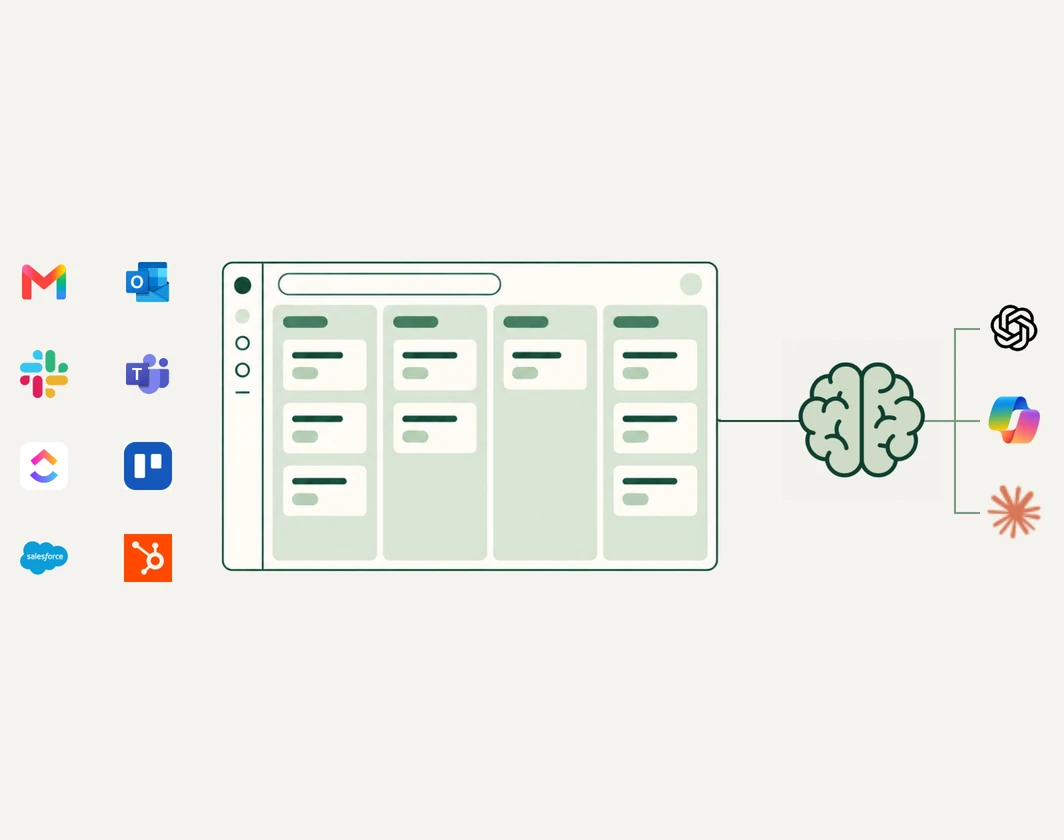
Tasks arrive through email, chat, tickets, and work-management tools. When one changes, you update the task, then re-enter the relevant details and project notes in a separate AI conversation.
Repeat that across projects throughout the day, and moving information starts replacing the work you are actually there to do.
THE INTENDED SHIFT
See the work together, decide what happens next, and move it forward from Seflo—without carrying the task and its story between tools.
An email needs a reply. In Seflo, it becomes a clear task beside the rest of your work, with the next step visible.
When the action is supported, reply, update, or complete the work from Seflo instead of reopening the tool where it arrived.
Connect a compatible AI and ask it to prepare a reply or next step for review. You decide what moves forward.
Stop being the bridge between tools. Be the conductor—choosing the next move, what gets sent, and where AI helps.
HOW IT WORKS · #HOW-IT-WORKS
Create your private workspace, connect what you need, and complete one real task from Seflo.
Continue with Google or Microsoft to create or open your private Seflo workspace.
Choose a supported work source and a compatible AI. Bring in one task, and Seflo keeps it linked to where it started.
Let your connected AI prepare the next move using the task and project knowledge you saved. Changes inside Seflo can run from your authorized request. Before anything is sent to or changed in a connected source, review and confirm the destination, recipients, content, attachments, and effects.
Keep the tools you already use. Seflo works alongside them, so you don’t have to replace every system to get started.
INTEGRATIONS
Connect the tools where work already arrives. Seflo brings actionable work together while keeping each task linked to its source.
Supported actions vary by connector.
ONE PERSONAL WORKSPACE
Bring the request, the work, and the project knowledge your AI needs into one personal workspace.
14 days free. No card required. No automatic subscription. Choose a paid plan to continue.
USD 9 / month
USD 108 billed annually · Save 25%
Or USD 12 billed monthly. Per user, excluding tax.
View pricing and plan detailsFAQ · #FAQ
Only actionable work explicitly promoted or synchronized according to a supported connector's behavior. Seflo does not automatically ingest every email, message, or provider record.
Only the authorized Seflo projects, tasks, project knowledge you deliberately save, and linked source activity available to that agent. Seflo does not transfer complete external AI conversations, hidden prompts, or private model state.
Inside Seflo, an authorized request can create or update tasks and project knowledge without a second confirmation. Anything that sends a message or changes a connected source requires your confirmation first. Available actions still depend on the connector and your permissions.
After you confirm the action, supported connector actions can include replies, status updates, completion signals, comments, or handoffs. Available actions vary by connector; Seflo does not promise universal bidirectional synchronization.
No. Identity sign-in creates or opens your private Seflo workspace. Connect each supported work source separately.
Connecting Gmail is optional and separate from signing in with Google. With your permission, Seflo reads relevant email messages to create tasks and keep linked conversations up to date, including automatic imports based on your connection settings. You can also create a task from the open email using the Gmail add-on and send replies from Seflo. When managed star synchronization is enabled, completing a task removes the linked email’s star; this update may take a short time. See our Privacy Policy for details on data use, sharing, retention, and deletion.
YOUR NEXT STEP
Sign in with Google or Microsoft to create or open your private Seflo workspace. Connecting work sources is a separate step.
Start using Seflo